RFFlow5.06.5.7
Publisher Description
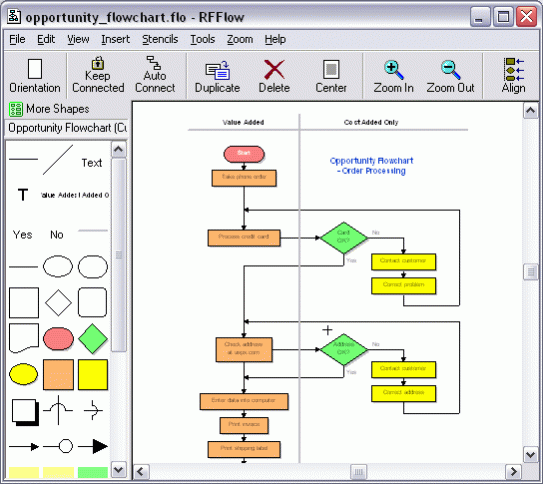
RFFlow is the ideal program for creating a wide variety of flowcharts, organization charts, and diagrams for education, business, and industry. It's easy to draw and edit charts with RFFlow. Simply drag a shape from a stencil to your chart. Shapes in RFFlow will automatically size around your text. Right-click on a shape or line to edit its properties. RFFlow includes over 1600 shapes that are carefully organized into stencils designed for specific tasks. The stencils are arranged in an expandable list that allows you to quickly find the stencil or shape you want. Each shape has a tooltip displaying its name or description. RFFlow has stencils for audit objects, brackets, cause-effect (fishbone) diagrams, computer/network design, CPM charts, criminal investigation diagrams, data flow diagrams, database definitions, electrical/electronics, entity relationship diagrams, flowcharting (basic flowcharting, DIN66001, physical flowcharting), fluid power design, gantt charts, genetic pedigree charts, Graham process flow, Greek alphabet, IDEF0, IDEF1X, industrial objects, office layouts, organization charts, pert charts, quality system/ISO 9000 charts, SDL charts, software design (UML, Booch, Gane/Sarson, Shlaer-Mellor OOA,Yourdan, and others), structure charts, timelines, transportation objects and WBS charts. You can use the RFFlow stencils or create your own custom stencils with just the shapes and lines you need. You can import bitmaps and clip art pictures from files or from the Clipboard and add them to a custom stencil. You can also draw your own custom shapes in RFFlow and add them to a stencil. Text is entered and formatted just like it is in your word processor. RFFlow is an OLE server so you can easily copy and paste your charts into Word or other Windows applications. You can embed or link your chart. RFFlow allows you to save your charts in GIF, JPEG, and HTML formats for use on Web sites. Technical support is free and unlimited.
About RFFlow
This program is available in English, Japanese. It was last updated on 29 October, 2026. RFFlow is compatible with the following operating systems: Windows.
The company that develops RFFlow is RFF Electronics. The latest version released by its developer is 5.06.5.7. This version was rated by 1 users of our site and has an average rating of 5.0.
The download we have available for RFFlow has a file size of 5.2 MB. Just click the green Download button above to start the downloading process. The program is listed on our website since 2020-04-28 and was downloaded 2,839 times. We have already checked if the download link is safe, however for your own protection we recommend that you scan the downloaded software with your antivirus. Your antivirus may detect the RFFlow as malware if the download link is broken.
How to install RFFlow on your Windows device:
- Click on the Download button on our website. This will start the download from the website of the developer.
- Once the RFFlow is downloaded click on it to start the setup process (assuming you are on a desktop computer).
- When the installation is finished you should be able to see and run the program.
Program Details
System requirements
Download information
Pricing
Version History
version 5.06.5.7
posted on 2020-04-28
We modified the way shapes are highlighted to minimize annoying blinking.
version 5.06_Revision5
posted on 2020-04-28
New User Interface
Consistent Operations
Float Over Highlight
Right-click Menus
Moving Shapes
Drawing Shapes
Drawing Curves
Duplicate
Delete
No Toolbars Needed
Disable Selection for Background Shapes
Documentation on the Web
version 5.06
posted on 2019-01-11
Added stencils with shapes for mathematics and military symbols.
